SCROLL_LIST
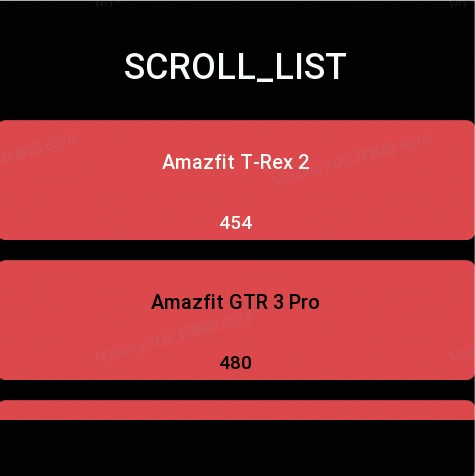
创建一块支持滑动的列表区域,每个列表的 item 中可以设置图片和文字。
创建 UI 控件
const scrollList = hmUI.createWidget(hmUI.widget.SCROLL_LIST, Param)
类型
Param: object
| 属性 | 说明 | 是否必须 | 类型 |
|---|---|---|---|
| x | 控件 x 坐标 | 是 | number |
| y | 控件 y 坐标 | 是 | number |
| w | 控件显示宽度 | 是 | number |
| h | 控件显示高度 | 是 | number |
| item_space | 每个 item 之间的间距 | 否 | number |
| item_config | item 配置信息 见下方说明 | 是 | ItemConfig |
| item_config_count | item_config 数组长度 | 是 | number |
| data_array | 数据集合 为一个结构体数组 见下方说明 | 是 | DataArray |
| data_count | 数据集合长度 | 是 | number |
| item_click_func | item 点击回调 | 否 | function |
| data_type_config | 每行数据要使用哪个 item 类型的配置信息 见下方说明 | 否 | array |
| data_type_config_count | 集合长度 | 否 | number |
| on_page | 更新数据时使用,设置为 1 表示更新数据后保留在当前 page | 否 | number |
ItemConfig: object
| 属性 | 说明 | 是否必须 | 类型 |
|---|---|---|---|
| type_id | 当前 item 类型 Id js 自己保证不重复 如果 item_config_count 为 0 时可不填,其他时候必填 | 否 | number |
| item_height | item 高 | 是 | number |
| item_bg_color | item 背景色 | 是 | number |
| item_bg_radius | item 背景圆角 | 是 | number |
| text_view | textView 结构体数组 每一项为一个 textView 见下方说明 | 否 | Array<TextView> |
| text_view_count | text_view 数组长度 | 否 | number |
| image_view | imageView 数组 每一项为一个 imageView 见下方说明 | 否 | Array<ImageView> |
| image_view_count | image_view 数组长度 | 否 | number |
item_config 完整配置
const item_config = [
  {
    type_id: 1,
    item_bg_color: 0xef5350,
    item_bg_radius: 10,
    text_view: [
      {
        x: 100,
        y: 0,
        w: 100,
        h: 20,
        key: 'name',
        color: 0xffffff
      },
      {
        x: 0,
        y: 30,
        w: 100,
        h: 100,
        key: 'age',
        color: 0xffffff,
        text_size: 20
      }
    ],
    text_view_count: 2,
    item_height: 130
  },
  {
    type_id: 2,
    item_bg_color: 0xef5350,
    item_bg_radius: 10,
    text_view: [{ x: 100, y: 0, w: 100, h: 20, key: 'like', color: 0x3d5afe }],
    text_view_count: 1,
    item_height: 100
  }
]
TextView: object
涉及位置信息的全是相对坐标
| 属性 | 说明 | 是否必须 | 类型 |
|---|---|---|---|
| x | x 坐标 | 是 | number |
| y | y 坐标 | 是 | number |
| w | 控件宽度 | 是 | number |
| h | 控件长度 | 是 | number |
| color | 文字颜色 | 否 | number |
| text_size | 字体大小 | 否 | number |
| key | 数据绑定 key 详情见使用例子和 data_array 说明 | 是 | string |
// 数组内的每一个结构体为一个 textView
const text_view = [
  { x: 100, y: 0, w: 100, h: 20, key: 'name', color: 0xffffff },
  { x: 0, y: 30, w: 100, h: 100, key: 'age', color: 0xffffff, text_size: 20 }
]
ImageView: object
涉及位置信息的全是相对坐标
| 属性 | 说明 | 是否必须 | 类型 |
|---|---|---|---|
| x | x 坐标 | 是 | number |
| y | y 坐标 | 是 | number |
| w | 控件宽度 | 是 | number |
| h | 控件长度 | 是 | number |
| key | 数据绑定 key 详情见使用例子和 data_array 说明 | 是 | string |
// 数组内的每一个结构体为一个imageView
const image_view = [{ x: 0, y: 0, w: 20, h: 20, key: 'img_src' }]
data_array 配置
- 每个 key 为上方添加 View 时的 key 值
- 渲染时会从每个 View 中拿到每个 view 的 key 值去 data_array 中查询
const dataList = [
  { img_src: rootPath + 'step/step_num_1.png', name: 'name1', age: '12' },
  { img_src: rootPath + 'step/step_num_1.png', name: 'name1', age: '13' },
  { img_src: rootPath + 'step/step_num_1.png', name: 'name1', age: '13' }
]
data_type_config 配置信息
如果配置的 type 的 id 是 item_config 的第 0 项 则可省略配置
| 属性 | 说明 | 是否必须 | 类型 |
|---|---|---|---|
| start | 开始的索引 | 是 | number |
| end | 结束的索引 | 是 | number |
| type_id | 配置的 type_id | 是 | number |
start 和 end 的关系为闭区间 [start, end]
{
data_type_config:[
  //代表索引从0到2的数据使用type_id为2的样式
  {
  start: 0,
  end: 2,
  type_id: 2,
  },
  {
  start: 3,
  end: 10,
  type_id: 1,
  },
],
data_type_config_count:2
}
刷新数据
const scrollList = hmUI.createWidget(hmUI.widget.SCROLL_LIST, Param)
scrollList.setProperty(hmUI.prop.UPDATE_DATA, {
  //重新设置配置信息
  data_type_config: [
    {
      start: 0,
      end: 2,
      type_id: 2
    }
  ],
  //配置信息长度
  data_type_config_count: 1,
  //新的数据
  data_array: [
    { img_src: rootPath + 'test/normalbtn_h.png', name: '姓名', age: '12', like: 'type2' },
    { img_src: rootPath + 'test/normalbtn_h.png', name: 'namex1', age: '13', like: 'type2' },
    { img_src: rootPath + 'test/normalbtn_h.png', name: 'namex2', age: '13', like: 'type2' },
    { img_src: rootPath + 'test/normalbtn_h.png', name: 'namex3', age: '12', like: 'type2' },
    { img_src: rootPath + 'test/normalbtn_h.png', name: 'name666', age: '13', like: 'type2' }
  ],
  //数据长度
  data_count: 5,
  //刷新数据后停留在当前页面,不设置或者设为0则回到list顶部
  on_page: 1
})
代码示例
Page({
  build() {
    const dataList = [
      { name: 'Amazfit T-Rex 2', size: 454 },
      { name: 'Amazfit GTR 3 Pro', size: 480 },
      { name: 'Amazfit GTR 3', size: 454 }
    ]

    hmUI.createWidget(hmUI.widget.SCROLL_LIST, {
      x: 0,
      y: 120,
      h: 300,
      w: 480,
      item_space: 20,
      item_config: [
        {
          type_id: 1,
          item_bg_color: 0xef5350,
          item_bg_radius: 10,
          text_view: [
            { x: 0, y: 0, w: 480, h: 80, key: 'name', color: 0xffffff, text_size: 20 },
            { x: 0, y: 80, w: 480, h: 40, key: 'size', color: 0xffffff }
          ],
          text_view_count: 2,
          item_height: 120
        },
        {
          type_id: 2,
          item_bg_color: 0xef5350,
          item_bg_radius: 10,
          text_view: [
            { x: 0, y: 0, w: 480, h: 80, key: 'name', color: 0x000000, text_size: 20 },
            { x: 0, y: 80, w: 480, h: 40, key: 'size', color: 0x000000 }
          ],
          text_view_count: 2,
          item_height: 120
        }
      ],
      item_config_count: 2,
      data_array: dataList,
      data_count: dataList.length,
      item_click_func: (item, index) => {
        console.log(`scrollListItemClick index=${index}`)
        updateConfig()
      },
      data_type_config: [
        {
          start: 0,
          end: 1,
          type_id: 1
        },
        {
          start: 1,
          end: 2,
          type_id: 2
        }
      ],
      data_type_config_count: 2
    })

    function updateConfig() {
      scroll_list.setProperty(hmUI.prop.UPDATE_DATA, {
        data_type_config: [
          {
            start: 0,
            end: 2,
            type_id: 1
          },
        ],
        data_type_config_count: 1,
        data_array: dataList,
        data_count: dataList.length,
        on_page: 1
      })
    }
  }
})