SCROLL_LIST
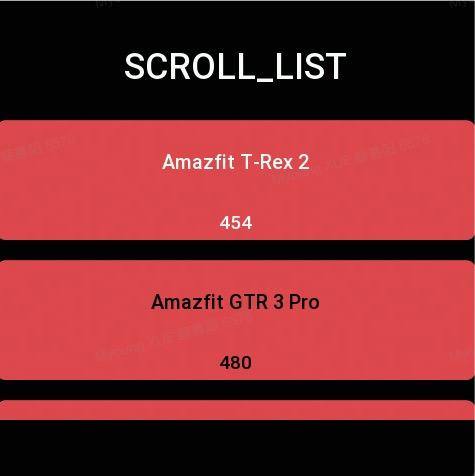
Create a sliding list area, which can be filled with pictures and text.
Create UI widget
const scrollList = hmUI.createWidget(hmUI.widget.SCROLL_LIST, Param)
Type
Param: object
| Properties | Description | Required | Type |
|---|---|---|---|
| x | The x-coordinate of the widget. | YES | number |
| y | The y-coordinate of the widget. | YES | number |
| w | Width of the widget. | YES | number |
| h | The height of the widget. | YES | number |
| item_space | Space between each item. | NO | number |
| item_config | Configuration information for item,see the description below. | YES | ItemConfig |
| item_config_count | The length of the item_config array. | YES | number |
| data_array | Data sets, a structure array, see description below. | YES | DataArray |
| data_count | The length of data set. | YES | number |
| item_click_func | Callback. | NO | function |
| data_type_config | Which item type configuration information should be used for each row of data, see the description below. | NO | array |
| data_type_config_count | The length of set. | NO | number |
| on_page | Used when updating data, set to 1 means keep the current page after updating the data. | NO | number |
ItemConfig: object
| Properties | Description | Required | Type |
|---|---|---|---|
| type_id | The current item type Id, js guarantees that it is NOt repeated. If item_config_count is 0, it can be left blank, otherwise it is required. | NO | number |
| item_height | Item's height. | YES | number |
| item_bg_color | Item's background color. | YES | number |
| item_bg_radius | The rounded corners of the item's background. | YES | number |
| text_view | The structure array of textView, each item is a textView. See the description below. | NO | Array<TextView> |
| text_view_count | Array's length of text_view. | NO | number |
| image_view | Array of imageView, each item is an imageView.See description below. | NO | Array<ImageView> |
| image_view_count | The length of the image_view array. | NO | number |
item_config Complete Configuration
const item_config = [
  {
    type_id: 1,
    item_bg_color: 0xef5350,
    item_bg_radius: 10,
    text_view: [
      {
        x: 100,
        y: 0,
        w: 100,
        h: 20,
        key: 'name',
        color: 0xffffff
      },
      {
        x: 0,
        y: 30,
        w: 100,
        h: 100,
        key: 'age',
        color: 0xffffff,
        text_size: 20
      }
    ],
    text_view_count: 2,
    item_height: 130
  },
  {
    type_id: 2,
    item_bg_color: 0xef5350,
    item_bg_radius: 10,
    text_view: [{ x: 100, y: 0, w: 100, h: 20, key: 'like', color: 0x3d5afe }],
    text_view_count: 1,
    item_height: 100
  }
]
TextView: object
All relative coordinates involving location information.
| Properties | Description | Required | Type |
|---|---|---|---|
| x | x-coordinate | YES | number |
| y | y-coordinate | YES | number |
| w | The width of widget. | YES | number |
| h | The length of the widget. | YES | number |
| color | The color of text. | NO | number |
| text_size | The size of text. | NO | number |
| key | Data binding.See usage examples and data_array descriptions for details. | YES | string |
// Each structure in the array is a textView.
const text_view = [
  { x: 100, y: 0, w: 100, h: 20, key: 'name', color: 0xffffff },
  { x: 0, y: 30, w: 100, h: 100, key: 'age', color: 0xffffff, text_size: 20 }
]
ImageView: object
All relative coordinates involving location information.
| Properties | Description | Required | Type |
|---|---|---|---|
| x | x-coordinate. | YES | number |
| y | y-coordinate. | YES | number |
| w | The width of widget. | YES | number |
| h | The length of the widget. | YES | number |
| color | The color of text. | NO | number |
| key | Data binding.See usage examples and data_array descriptions for details. | YES | string |
// Each structure in the array is an imageView.
const image_view = [{ x: 0, y: 0, w: 20, h: 20, key: 'img_src' }]
data_array Configuration
- Each key is the key value when the View is added above.
- Rendering will get the key value of each view from each View and look it up in the data_array.
const dataList = [
  { img_src: rootPath + 'step/step_num_1.png', name: 'name1', age: '12' },
  { img_src: rootPath + 'step/step_num_1.png', name: 'name1', age: '13' },
  { img_src: rootPath + 'step/step_num_1.png', name: 'name1', age: '13' }
]
data_type_config Configuration Information
If the id of the configured type is the 0 item of item_config then the configuration can be omitted.
| Properties | Description | Required | Type |
|---|---|---|---|
| start | Index of start | YES | number |
| end | Index of the end | YES | number |
| type_id | ID | YES | number |
The relationship between start and end is the closed interval [start, end].
{
data_type_config:[
  //The data representing the index from 0 to 2 uses the style with type_id of 2.
  {
  start: 0,
  end: 2,
  type_id: 2,
  },
  {
  start: 3,
  end: 10,
  type_id: 1,
  },
],
data_type_config_count:2
}
Refresh data
const scrollList = hmUI.createWidget(hmUI.widget.SCROLL_LIST, Param)
scrollList.setProperty(hmUI.prop.UPDATE_DATA, {
  //Reset configuration information
  data_type_config: [
    {
      start: 0,
      end: 2,
      type_id: 2
    }
  ],
  //Configuration the length of information
  data_type_config_count: 1,
  //New data
  data_array: [
    { img_src: rootPath + 'test/NOrmalbtn_h.png', name: 'Name', age: '12', like: 'type2' },
    { img_src: rootPath + 'test/NOrmalbtn_h.png', name: 'namex1', age: '13', like: 'type2' },
    { img_src: rootPath + 'test/NOrmalbtn_h.png', name: 'namex2', age: '13', like: 'type2' },
    { img_src: rootPath + 'test/NOrmalbtn_h.png', name: 'namex3', age: '12', like: 'type2' },
    { img_src: rootPath + 'test/NOrmalbtn_h.png', name: 'name666', age: '13', like: 'type2' }
  ],
  //The length of the data
  data_count: 5,
  //Refresh the data and stay on the current page. If it is not set or set to 0, it will return to the top of the list.
  on_page: 1
})
Code example
const dataList = [
  { name: 'a', age: 12, like: 2 },
  { name: 'b', age: 13, like: 3 },
  { name: 'c', age: 13, like: 4 }
]

function scrollListItemClick(list, index) {
  console.log('scrollListItemClick index=' + index)
}

hmUI.createWidget(hmUI.widget.SCROLL_LIST, {
  x: 10,
  y: 10,
  h: 454,
  w: 200,
  item_space: 10,
  item_config: [
    {
      type_id: 1,
      item_bg_color: 0xef5350,
      item_bg_radius: 10,
      text_view: [
        { x: 0, y: 0, w: 100, h: 100, key: 'name', color: 0xffffff, text_size: 20 },
        { x: 0, y: 100, w: 100, h: 30, key: 'age', color: 0xffffff }
      ],
      text_view_count: 2,
      item_height: 130
    },
    {
      type_id: 2,
      item_bg_color: 0xef5350,
      item_bg_radius: 10,
      text_view: [
        { x: 0, y: 0, w: 100, h: 100, key: 'name', color: 0xffffff, text_size: 20 },
        { x: 100, y: 0, w: 100, h: 100, key: 'like', color: 0x3d5afe }
      ],
      text_view_count: 2,
      item_height: 130
    }
  ],
  item_config_count: 2,
  data_array: dataList,
  data_count: dataList.length,
  item_click_func: scrollListItemClick,
  data_type_config: [
    {
      start: 0,
      end: 1,
      type_id: 1
    },
    {
      start: 1,
      end: 2,
      type_id: 2
    }
  ],
  data_type_config_count: 2
})