Quick Start
Intro
This article will demonstrate how to create, develop, and test a Zepp OS Workout Extension application through a complete example.
Before we begin, let me introduce some relevant background:
- Workout Extension can only be used on devices with API_LEVEL 3.6 or above
- Workout Extension has the capabilities of most JS APIs, but there are some limitations. For details, please refer to API restrictions
- Workout Extension is an independent application with an independent appId. It needs to be created, submitted, and reviewed in the developer background before it can be launched on the app store
- Users can configure to run multiple Workout Extensions simultaneously
Basic process
1. Environmental preparation
The development process of "Workout Extension" is the same as that of Zepp OS Mini Program, and the required power builder is the same. Please refer to Environment Preparation to complete the environment preparation.
2. Create project
In the process of creating a project, we directly use the zeus create workout-sample command of the Zeus CLI tool to create a "Workout Extension" template project. Select the project type as WORKOUT_EXTENSION.
Please install the latest version of Zeus CLI using npm i @zeppos/zeus-cli -g before executing the command
3. Run in simulator
This step-by-step process is consistent with the Zepp OS Mini Program. Refer to Running Simulator to complete the installation and operation of the emulator.
Use the Terminal to enter the newly created "Workout Extension" directory, execute the zeus dev compile preview command, and we can see our workout extension application in the Simulator.
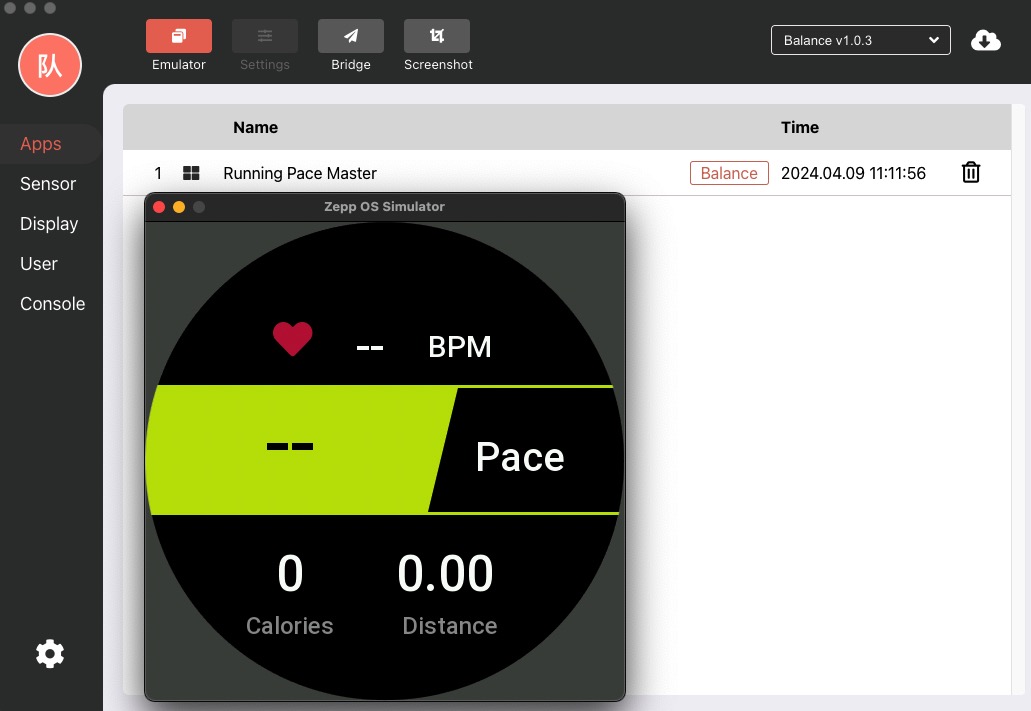
For the convenience of developers, the Workout Extension is displayed in the application list in the emulator, and the real machine needs to be added in the workout application (not displayed in the application list).
4. Preview on a Watch
This development process is consistent with the Zepp OS Mini Program. Refer to Preview on a Watch to complete the real machine preview.
Relevant points
"Workout Extension" related APIs
- DataWidget Construction function
- SPORT_DATA widget
- The SPORT_DATA widget is an API specially designed for "Workout Extension", with rich data item display types, which can achieve real-time display of sports data
- getSportData
- The
getSportDatainterface can obtain real-time data of sports applications, and developers can process and record the data
- The
app.json
Please refer to Mini Program Configuration for app.json.
The difference between Workout Extension is only in the configuration of the module field, where data-widget represents the Workout Extension configuration.
"Workout Extension" can only be used on devices with API_LEVEL 3.6 or above, and "minVersion" needs to be configured to 3.6.
The widgets field is an array with a maximum length of 1. This means that in a Workout Extension application with the same appId, up to 1 Workout Extension plugin can exist simultaneously (multiple plugins may be supported later).
"module": {
  "data-widget":{
    "widgets": [{
      "path": "pages/plugin1",
      "name": "plugin2",
      "icon": "icon2.png",
      "runtime": {
        "ability": [{
          "type": 1,
          "subType": [1, 2, 3]
        }]
      }
    }]
  },
}
| Properties | Type | Description |
|---|---|---|
| type | number | Currently, only 1 can be filled in, representing the "Workout Extension" type |
| subType | Array<number> | Supported sports types, an empty array [] represents support for all sports types, for the meanings of other sports types, please refer to the subType sports types at the end of the article |
The following pictures show the interface of the circular and square screen watches when they are turned on for workout. When isPinned: 0 is set, you can see the floating battery and time bars at the top.


Under the circular screen of 480px, the height of the floating bar is 68px. Under the circular screen of 454 px, the height of the floating bar is scaled proportionally Math.ceil (454/480 * 68) = 64 px.
On a square screen with a height of 390px, the height of the floating bar is 60px.
Life Cycle
Workout Extension is basically the same as Zepp OS Mini Program Lifecycle, with the addition of onResume and onPause lifecycles.
Before introducing the lifecycle, let's introduce a concept called "Pause" state. In this state, the context information of the application will be retained, but it cannot respond to the registered callback function, and the registered timer will pause.
After adding the "Workout Extension" plugin, trigger the onCreate lifecycle of app.js.
Then execute the onInit and build lifecycles of the "Workout Extension". Afterwards,app.js enters the "Pause" state until it enters the corresponding "Workout Extension".
"Workout Extension" has the feature of gaining focus, that is, when the page focuses on the "Workout Extension" plug-in, it will trigger the onResume life cycle, and when the "Workout Extension" loses focus, it will trigger the onPause life cycle.
When the "Workout Extension" plugin loses focus, it will enter the "Pause" state.
API restrictions
"Workout Extension" has some limitations in UI interaction.
- The drawing area is limited, and UI widgets can only be drawn within the boundaries of the device screen. For example, the drawing area size of "Workout Extension" on Amazfit T-Rex Ultra devices is consistent with the screen resolution of 454 x 454 px.
- Can only display single-page content, does not support long page scrolling.
- Sliding operation is not supported. Widgets such as
SCROLL_LIST,VIEW_CONTAINER,PAGE_INDICATOR,SCROLL_BARthat support sliding or stacking layout are not supported on the page. - Does not support gesture monitoring.
- Does not support button response.
- Support
CLICKevent. Widgets within the page support click events.
Workout Extension i18n configuration
"i18n": {
  "ar-EG": {
    "data-widget": {
      "widgets": [
        {
          "name": "Running Pace Master"
        }
      ]
    }
  },
  "ca-ES": {
    "data-widget": {
      "widgets": [
        {
          "name": "Running Pace Master"
        }
      ]
    }
  },
}
Full Example
Please see the Zepp Health Github sample repository workout-extension
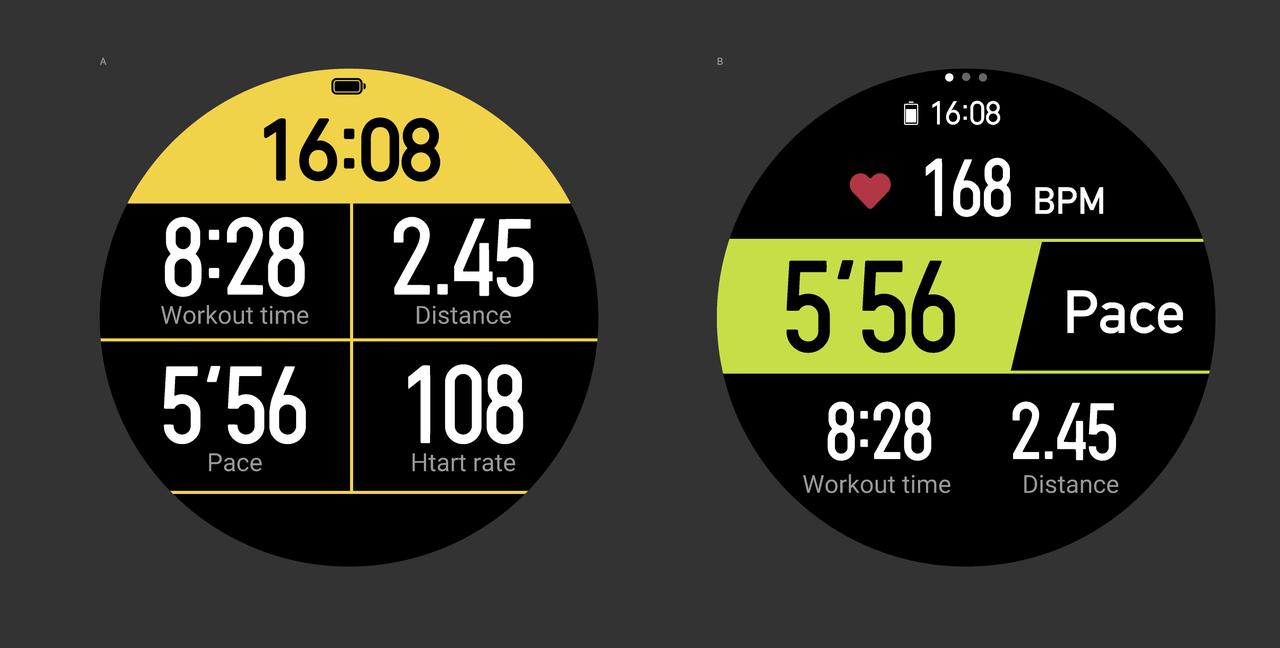
Three examples are provided in total
- Running Data Assistant(Left side of the above picture)
- Running Pace Master(Right side of the above picture)
- Running Pace Master With Side Service(Demonstrated the use of Side App)
Appendix
SubType workout type value
subType value | Motion type |
|---|---|
1 | Outdoor Running |
2 | Treadmill (original indoor running) |
3 | Walking |
4 | Outdoor Cycling |
5 | Free Training |
6 | Pool Swimming |
7 | Open Water Swimming |
8 | Indoor Riding |
9 | Elliptical Machine |
10 | Mountaineering |
11 | Cross Country Running |
12 | Skiing |
15 | Outdoor Hiking |
17 | Tennis |
18 | Football |
19 | Ironman Triathlon |
20 | Compound Motion |
21 | Jump Rope |
23 | Rowing Machine |
24 | Indoor Fitness |
40 | Indoor Walking |
41 | Curling |
42 | Snowboarding |
43 | Alpine Skiing |
44 | Outdoor Skating |
45 | Indoor Skating |
46 | Cross-Country Skiing |
47 | Mountain Cycling |
48 | BMX |
49 | High Intensity Interval Training |
50 | Core Training |
51 | Mixed Aerobic |
52 | Strength Training |
53 | Stretching |
54 | Climber |
55 | Flexibility Training |
57 | Step Training |
58 | Stepper |
59 | Gymnastics |
60 | Yoga |
61 | Pilates |
62 | Surfing |
63 | Hunting |
64 | Fishing |
65 | Sailing |
66 | Outdoor Boating |
67 | Skateboard |
68 | Paddleboarding |
69 | Roller Skating |
70 | Rock Climbing |
71 | Ballet |
72 | Belly Dance |
73 | Square Dance |
74 | Street Dance |
75 | Ballroom Dance |
76 | Dance |
77 | Zumba |
78 | Cricket |
79 | Baseball |
80 | Bowling |
81 | Squash |
82 | Rugby |
83 | Golf |
84 | Golf swing |
85 | Basketball |
86 | Softball |
87 | Gateball |
88 | Volleyball |
89 | Ping Pong |
90 | Hockey |
91 | Handball |
92 | Badminton |
93 | Archery |
94 | Equestrian Sports |
95 | Swordsmanship |
96 | Karate |
97 | Boxing |
98 | Judo |
99 | Wrestling |
100 | Tai Chi |
101 | Muay Thai |
102 | Taekwondo |
103 | Martial Arts |
104 | Free Fighting |
105 | Snowboarding |
106 | Kitesurfing |
108 | Climb the stairs |
109 | Fitness |
110 | Orienteering |
111 | Group Exercise |
112 | Latin Dance |
113 | Jazz Dance |
114 | Combat Exercise |
115 | Hula hoop |
116 | Frisbee |
117 | Dart |
118 | Flying a Kite |
119 | Tug-of-war |
120 | Kicking shuttlecock |
121 | Beach Football |
122 | Beach Volleyball |
123 | Drifting |
124 | Motorboat |
125 | Bicycle |
126 | Sled |
127 | Orienteering |
128 | Winter Biathlon |
129 | Parkour |
130 | Cross-training |
131 | Race Walking |
132 | Driving |
133 | Paragliding |
134 | One minute sit-ups |
135 | One minute skipping rope |
136 | Snowmobile |
137 | Off-Road Motorcycle |
138 | Dragon Boat |
139 | Water Ski |
140 | Kayaking |
141 | Rowing |
142 | Polo |
143 | Spinning Bike |
144 | Walking Machine |
145 | Racquetball |
146 | Folk Dance |
147 | Jiu-Jitsu |
148 | Fencing |
149 | Horizontal Bar |
150 | Parallel bars |
151 | Billiards |
152 | Sepak takraw |
153 | Dodgeball |
154 | Water Polo |
155 | Fin swimming |
156 | Synchronized Swimming |
157 | Snorkeling |
158 | Ice Hockey |
159 | Swing |
160 | Shuffleboard |
161 | Table Football |
162 | Shuttlecock |
163 | Somatosensory Games |
164 | Indoor Football |
165 | Hip Hop Dance |
166 | Pole Dance |
167 | Battle Rope |
168 | Break Dance |
169 | Sandbag Ball |
170 | Bocce |
171 | Pull back the ball |
172 | Indoor Surfing |
173 | Chess |
174 | Checkers |
175 | Go |
176 | Bridge |
177 | Board Game |
178 | Snowshoe Hiking |
179 | Shooting |
180 | Skydiving |
181 | Downhill |
182 | Bungee Jumping |
183 | Trampoline |
184 | Bouldering |
185 | Modern Dance |
186 | Disco |
187 | Tap Dance |
188 | Floor ball |
189 | Electronic Sports |
190 | ATV |
191 | Football (without GPS) |
192 | Playground Running |
193 | Fishing (Number of Fishes) |
194 | Indoor Rock Climbing |
195 | Mountaineering and Skiing |
196 | Outdoor Freediving |
197 | Indoor freediving |
198 | Fishing and Hunting |
199 | Simple Tennis |
200 | Wakewave Surfing |
201 | Surfing (identify number of trips) |
202 | Kitesurfing (Identification Gliding) |
203 | Ultra Marathon |